If you’re hunting for a free website builder powered by AI to get your site up without spending a cent upfront, you’re not alone. In early 2026, free website builders have become surprisingly capable—many let you create a professional-looking, mobile-ready site in minutes just by chatting with the tool or answering a few questions.
I actually tested these hands-on (built a simple portfolio, a service page, and a mini blog) to see what really works on free plans speed, design quality, ease of use, limitations, and how well they handle free website creation in real life. No fluff, just honest thoughts for beginners, side-hustlers, or anyone testing ideas on zero budget.
These picks focus on truly usable free tiers (or generous trials) in February 2026. Let’s jump in.
Why Choose a Free Website Builder AI in 2026?
AI has made free website creation realistic for almost anyone:
- Describe your idea → get a full draft site (layout, text, images) in seconds to minutes.
- No coding needed—most offer drag-and-drop editing after generation.
- Built-in mobile responsiveness, basic SEO, and hosting included.
- Perfect for portfolios, landing pages, personal sites, or MVP business pages.
Real talk: Free plans usually include branding (like “Made with [Tool]”), subdomain instead of custom domain, and some feature limits. But you can launch something solid and upgrade later if it grows.
My Top Free Website Builders AI in 2026 (Hands-On Tested)
1. Wix – Best Overall Free Website Builder AI
Wix’s AI (now called Harmony) is still the king for free users. I described “minimalist photography portfolio” → got a clean, image-heavy site with nice animations and placeholder text in ~2 minutes.
- Free plan highlights: Full AI generation, drag-and-drop edits, 500MB storage, basic SEO tools.
- Limitations: Wix branding + ads on free sites, no custom domain.
- Best for: Creatives, portfolios, small personal projects.
- Link: Start with Wix Free AI Builder
Wix- AI Tutorial
2. Nicepage – No Coding Website Builder
Nicepage is the king for drag-and-drop website building, turning stunning designs into live sites without code.
- Best Overall Free Website Builder AI Portfolio – Nicepage’s AI now builds full portfolios in “2 minutes flat” with pro photography placeholders.
- Clean image-heavy sites with full animations and placeholder text.
- Free plan highlights: Full AI, drag-and-drop editor, 500MB storage, SEO tools.
- Limitations: Custom branding, ads on free sites, no custom domain.
- Link: Try Nicepage No Coding Website Builder
3. Hostinger AI Website Builder – Best Free Trial / Budget Upgrade Path
Hostinger gives a solid taste for free (trial) and jumps to very cheap paid plans. My test site (freelance coaching page) looked surprisingly pro with auto-SEO and heatmaps.
- Free aspects: Full AI build during trial, preview everything.
- Limitations: No permanent free hosting—paid starts ~$2.99/mo (often with big discounts).
- Best for: Anyone who might upgrade soon—great value even “free” to start.
- Link: Try Hostinger AI Website Builder
Hostinger Tutorial
4. Framer AI – Best Free for Modern, Designer-Level Looks
Framer’s free tier lets you generate and publish beautiful, interactive sites. My landing page test had smooth animations and a premium vibe right away.
- Free plan highlights: Unlimited public sites, AI generation, basic publishing.
- Limitations: Framer branding, limited custom code on free.
- Best for: Designers, startups wanting stylish one-pagers or portfolios.
- Link: Try Framer AI Free
Framer tutorial
5. Durable – Fastest Free Trial for Quick Business Sites
Durable builds in under 60 seconds—entered “Amsterdam coffee shop” → got homepage + menu + contact with AI copy.
- Free aspects: Trial build + preview; very fast.
- Limitations: Full publish requires paid (~$12/mo).
- Best for: Local services, MVPs, super-quick tests.
- Link: Try Durable AI
Durable Tutorial
6. WordPress.com with AI Assistant – Best Fully Free & Open Long-Term
WordPress.com offers AI content generation and block patterns for free. I built a simple blog—it’s not “full AI site gen” like Wix, but very flexible once you start.
- Free plan highlights: No time limit, subdomain, basic AI writing help.
- Limitations: Ads, limited themes/plugins on free.
- Best for: Bloggers or people wanting to grow without lock-in.
- Link: Start Free on WordPress.com
WordPress Tutorials
Quick Comparison – Free Website Builders 2026
| Builder | Free Tier Strength | Setup Speed | Customization | Best Use Case | Upgrade Needed For |
|---|---|---|---|---|---|
| Wix | ★★★★★ (full features) | Very Fast | High | Portfolios & creative | Custom domain |
| Nicepage | ★★★★ (design-focused free tier) | Fast | Very High | Designers & landing pages | Hosting & full export |
| Hostinger | ★★★★ (great trial) | Fast | Medium-High | Budget future-proof | Hosting & domain |
| Framer | ★★★★ (publish free) | Fast | Very High | Modern / interactive | Remove branding |
| Durable | ★★★ (trial only) | Ultra Fast | Medium | Quick business MVPs | Full publish |
| WordPress.com | ★★★★ (unlimited time) | Medium | High | Blogs & scalable sites | No ads / plugins |
Tips to Make Your Free AI Site Look Pro
- Write detailed prompts: “Clean modern portfolio for freelance graphic designer in Amsterdam, dark mode option, contact form, blog section.”
- Always rewrite AI text—use Claude or Grok for natural, personal tone.
- For small code tweaks → Blackbox AI helps fast.
- Preview on mobile immediately and fix spacing.
- Add your own photos—AI suggestions are okay starters.
Example:
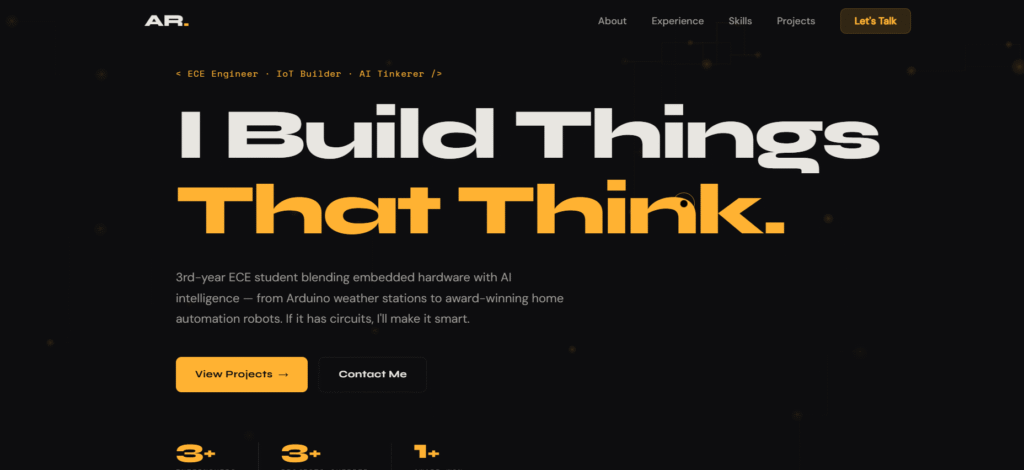
Giving a very accurate prompt to Claude along with resume, to generate a portfolio website
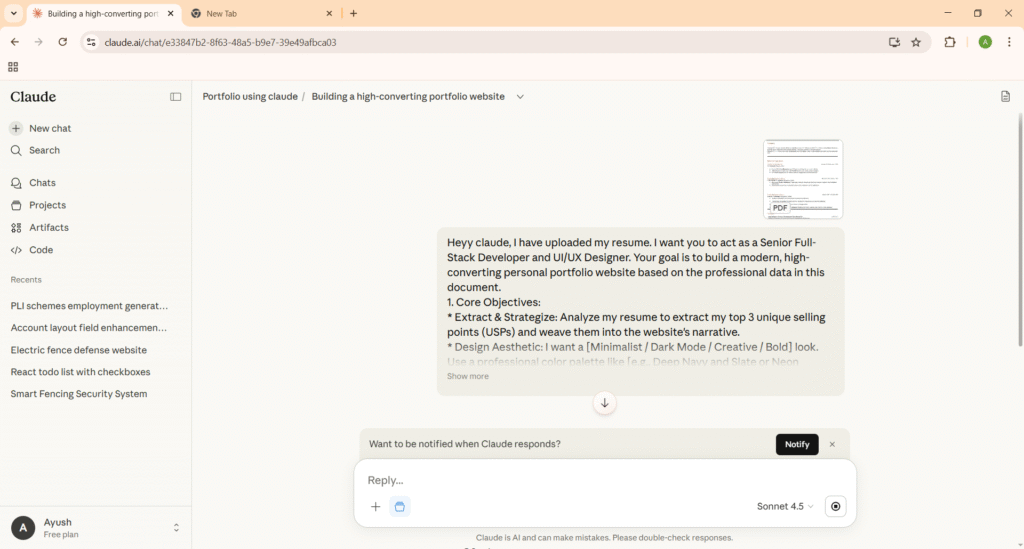
After downloading all files and hosting them on Github I got the output given below:
Final Thoughts – Which Free Website Builder to Pick?
- Want the most powerful free experience → start with Wix.
- Planning to upgrade soon anyway → Hostinger gives best value.
- Love clean, modern design → Framer free tier punches above its weight.
- Need something in 60 seconds → Durable trial is unbeatable.
Free AI website builders in 2026 make launching online dead simple—no excuses left for not having a site.
Which one are you trying first? Or have you built something cool with these free tools? Share in the comments—I’d love to hear your wins (or headaches)!
FAQs – Free Website Builder AI 2026
Is there a completely free AI website builder with no ads?
WordPress.com comes closest (minimal ads), but Wix and Framer free tiers are the most feature-rich.
Can free plans handle a custom domain?
Usually no—most require upgrade (~$10–20/mo) for custom domain + remove branding.
Are these good for online stores on free?
Basic yes (Wix has light e-commerce preview), but serious selling needs paid.
How do I improve AI-generated content?
Paste into Grok or Claude and ask to “make this warmer and more personal.
Happy creating, drop your site link if you build one!