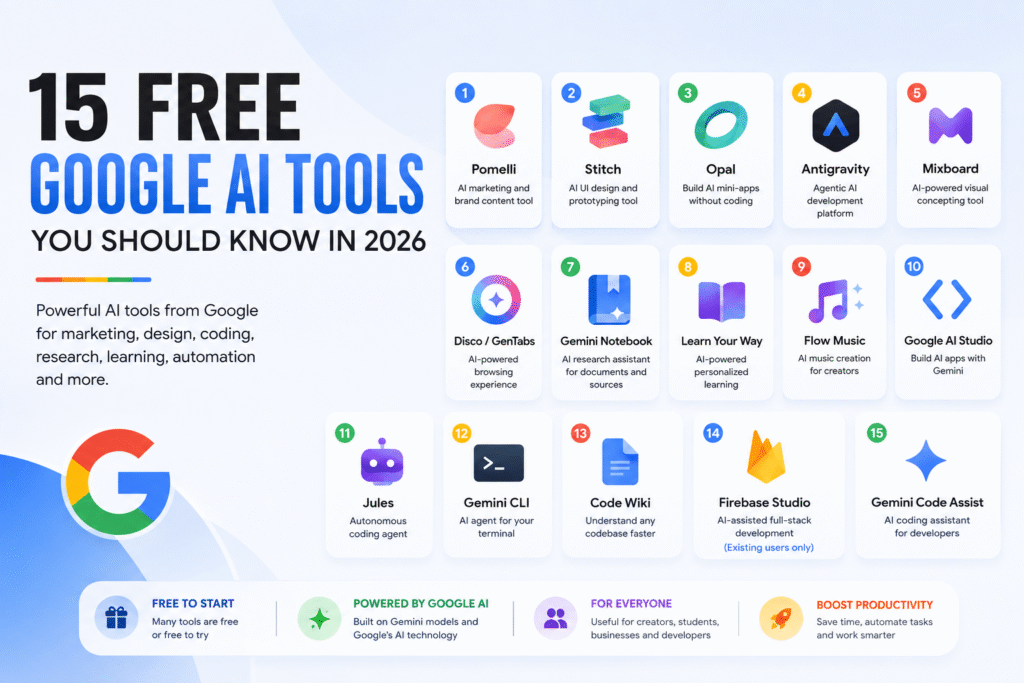
Quick Answer: What Are the Best Free Google AI Tools in 2026?
Google has built far more AI products than just Gemini. In 2026, its AI ecosystem includes tools for marketing, visual design, automation, app development, coding, research, learning, music and browsing.
Some of the most useful Google AI tools include Pomelli for marketing, Stitch for UI design, Opal for AI workflows, Mixboard for visual ideation, Gemini Notebook for research, Google AI Studio for AI app development, Jules for autonomous coding, Gemini CLI for terminal-based development and Gemini Code Assist for AI-assisted programming.
However, “free” does not always mean unlimited. Several Google Labs products are experiments, beta products or region-limited services, while some have usage limits. Firebase Studio, for example, has stopped accepting new workspace creation and Google recommends migrating new development to Google AI Studio or Antigravity.
15 Free Google AI Tools at a Glance
| Google AI Tool | Best For | Category | Current Status |
|---|---|---|---|
| Pomelli | Brand and marketing content | AI Marketing | Google Labs |
| Stitch | UI design and prototyping | AI Design | Google Labs |
| Opal | No-code AI workflows | Automation | Google Labs |
| Antigravity | Agentic software development | AI Coding | Available |
| Mixboard | Moodboards and visual concepts | Creative AI | Google Labs |
| Disco / GenTabs | AI-powered browsing | AI Browser | Experiment / waitlist |
| Gemini Notebook | Research and document analysis | AI Research | Available |
| Learn Your Way | Personalized learning | AI Education | Research experiment |
| Flow Music / ProducerAI | AI music creation | AI Music | Google Labs |
| Google AI Studio | Building AI applications | AI Development | Available |
| Jules | Autonomous coding tasks | AI Coding Agent | Available |
| Gemini CLI | AI inside the terminal | Developer AI | Open source |
| Code Wiki | Understanding codebases | Developer AI | Public preview |
| Firebase Studio | Full-stack development | AI Development | Existing users only |
| Gemini Code Assist | AI coding assistance | AI Coding | Free individual tier |
What Are Google AI Tools?
Google AI tools are applications and developer products powered by Google’s artificial intelligence models and infrastructure. They cover much more than conversational AI.
Depending on the product, you can use Google’s AI tools to:
- Generate marketing content
- Create brand assets
- Design websites and app interfaces
- Build AI workflows without traditional coding
- Prototype full-stack applications
- Analyze documents and research material
- Turn study material into interactive learning experiences
- Generate music
- Understand large codebases
- Fix software bugs
- Write and modify code
- Work with AI directly from a terminal
Google’s broader AI ecosystem is increasingly moving from AI that answers questions to AI that can take actions and complete multi-step tasks. Google described this shift at I/O 2026 as part of its move toward an “agent-first” development ecosystem.
1. Pomelli – AI Marketing and Brand Content Tool
Best for: Small businesses, marketers, creators, founders and social media teams
Pomelli is one of Google’s most interesting AI marketing experiments.
Instead of simply asking an AI to “write an Instagram post,” Pomelli is designed to understand a business’s brand identity and use that information to generate marketing content.
Google’s latest update introduced Pomelli Agent, which can help establish a business’s “Business DNA” from existing materials. It can also generate brand books and websites.
What can Pomelli do?
You can use it to:
- Develop a brand identity
- Generate on-brand marketing content
- Create social media campaigns
- Generate advertising concepts
- Create brand books
- Produce marketing visuals
- Create websites
The important difference is that Pomelli focuses on brand consistency, rather than treating every prompt as an isolated content request.
Who should use Pomelli?
Pomelli is particularly useful for:
- Solo founders
- Small businesses
- Freelancers
- Marketing teams
- Social media managers
- Creators
If you run a business without a dedicated designer or marketing department, Pomelli is worth exploring.
2. Stitch – AI UI Design Tool by Google
Best for: UI designers, developers, founders and product teams
Stitch is Google’s AI-powered interface design tool.
You can describe an interface using natural language and generate high-fidelity UI designs. Google has continued expanding Stitch into an AI-native design canvas where users can iterate on interfaces using text, voice and existing design or code assets.
For example, you could describe:
“Create a modern dashboard for a SaaS accounting platform with a clean white interface, sidebar navigation and financial KPI cards.”
Stitch can turn that idea into a visual interface that you can continue refining.
What makes Stitch useful?
Stitch can help bridge the gap between:
Idea → UI design → development
That makes it particularly useful for founders and freelancers who need to visualize an app before investing significant development time.
Best use cases
- Website mockups
- SaaS dashboards
- Mobile app interfaces
- Landing pages
- MVP prototypes
- Client design concepts
3. Opal – Build AI Mini-Apps Without Coding
Best for: Non-technical users, marketers, entrepreneurs and automation enthusiasts
Opal lets users create AI-powered mini-apps and workflows using natural language.
Google describes Opal as a tool for building, editing and sharing AI mini-apps without traditional coding. It combines natural-language creation with a visual workflow editor.
Instead of manually programming a workflow, you can describe what you want the application to do.
For example:
Input: A long article
Workflow: Analyze → summarize → generate social posts → create hooks
Output: A ready-to-use content package
Who should use Opal?
Opal can be useful for:
- Content creators
- Marketing teams
- Small businesses
- Freelancers
- Students
- Entrepreneurs
- People experimenting with AI automation
It is especially interesting for people who want automation but don’t want to start by learning traditional workflow tools.
4. Google Antigravity – Agentic AI Development Platform
Best for: Developers, builders and people experimenting with AI agents
Google Antigravity represents a different direction from traditional AI coding assistants.
Rather than simply completing the next line of code, Antigravity is designed around AI agents that can plan and execute development tasks.
Google describes Antigravity as an agentic development platform. Its current ecosystem includes an agentic IDE, CLI and SDK, with capabilities for managing multiple agents and automating development workflows.
What can Antigravity help with?
Depending on the workflow, agents can:
- Understand project requirements
- Modify multiple files
- Run commands
- Test applications
- Work with browsers
- Manage development tasks
- Coordinate multiple agents
The result is a shift from:
“AI helps me write code.”
to:
“AI helps me complete a development task.”
That distinction is important as AI coding becomes increasingly agentic.
5. Mixboard – AI-Powered Visual Concepting
Best for: Designers, marketers, creators, founders and anyone developing visual ideas
Mixboard is an AI-powered concepting board from Google Labs.
Think of it as an AI-assisted visual workspace where you can explore ideas using images and text.
Google describes Mixboard as a tool for exploring, expanding and refining ideas. Users can start with prompts, add their own images, generate new visuals and modify concepts using natural language.
What can you use Mixboard for?
- Brand moodboards
- Product concepts
- Event themes
- Interior design concepts
- Social media ideas
- Thumbnail concepts
- Marketing campaigns
- Visual brainstorming
Instead of trying to explain a visual idea to someone else, you can create a rough visual direction yourself first.
Important availability note
Mixboard is an experimental Google Labs product and availability can vary by region. Google’s current page indicates regional restrictions.
6. Disco – AI-Powered Browsing With GenTabs
Best for: Researchers, heavy browser users and people working with multiple tabs
Disco is Google’s experimental playground for exploring new AI-powered web experiences.
Its first major feature, GenTabs, can turn the information contained in your open browser tabs into custom interactive applications based on your goal.
For example, imagine you have tabs open for:
- Hotels
- Flights
- Restaurants
- Tourist attractions
Instead of manually comparing everything, GenTabs can potentially turn that collection of information into an interactive planning experience.
Google is also experimenting with an AI-Enabled Pointer that can answer questions about a webpage, find relevant sections and help navigate information.
Who should try Disco?
It may be particularly useful for:
- Researchers
- Students
- Travel planners
- Marketers
- Analysts
- People who regularly work with dozens of browser tabs
7. Gemini Notebook – AI Research Assistant
Best for: Students, researchers, writers, analysts and businesses
If you have PDFs, research papers, reports, presentations or other source material, Gemini Notebook is one of Google’s most useful AI research tools.
Google recently renamed NotebookLM to Gemini Notebook, while retaining its core research-focused experience.
You can upload sources such as:
- PDFs
- Websites
- YouTube videos
- Audio files
- Google Docs
- Google Slides
Gemini Notebook can then answer questions based on your sources and provide inline citations. It can also create study guides, mind maps and audio overviews.
Why is source grounding important?
Instead of asking a general chatbot about a subject, you can give Gemini Notebook the exact documents you want it to analyze.
This is particularly useful for:
Research → Analysis → Summary → Knowledge
For businesses, it can be used with reports, strategy documents, market research and internal material. Google specifically positions Gemini Notebook as a research and thinking partner for business users.
8. Learn Your Way – AI-Powered Personalized Learning
Best for: Students and self-learners
Learn Your Way is a Google Research experiment exploring how AI can transform traditional educational material into personalized learning experiences.
Instead of simply reading a textbook PDF, the system can transform source material into different formats, including:
- Interactive text
- Quizzes
- Slides and narration
- Audio lessons
- Mind maps
The experience can adapt material based on learner characteristics and interests.
Google’s research reported that students using Learn Your Way scored 11 percentage points higher on a retention assessment than students using a standard digital reader in its study. This is an experimental research result, not a guarantee that every learner will experience the same improvement.
For students, the bigger idea is simple:
Static textbook → Interactive AI learning experience
9. Flow Music – Formerly ProducerAI
Best for: Musicians, creators, video makers and content producers
The tool originally highlighted as ProducerAI has evolved into Google’s Flow Music ecosystem.
Google describes ProducerAI as a generative AI music platform that allows creators to develop and refine music using natural-language interaction.
Google later expanded the product under Flow Music, powered by its Lyria music technology.
What can AI music tools like Flow Music help with?
Creators can explore:
- Music ideas
- Melodies
- Genres
- Moods
- Lyrics
- Background music
- Musical arrangements
This can be useful for YouTubers, Reel creators, filmmakers and musicians who need to experiment with original music ideas.
Important note
Before using generated music commercially, always check the current licensing and usage terms for the specific product and plan.
10. Google AI Studio – Build AI Apps With Gemini
Best for: Developers, founders, students, researchers and AI builders
Google AI Studio has evolved from being primarily a place to experiment with Gemini prompts into a much more capable application-building environment.
Its current Build mode allows users to describe an application in natural language and generate a working application.
Google AI Studio can now support:
- Full-stack web applications
- Native Android applications
- Server-side logic
- API integrations
- Databases
- Authentication
- Google Workspace integrations
- AI-powered features
For example, instead of starting by manually writing hundreds of lines of code, you could describe:
“Build a dashboard that reads data from Google Sheets and displays monthly sales KPIs.”
AI Studio can generate the initial application and allow you to continue refining it through prompts.
Why Google AI Studio matters
It dramatically lowers the barrier to experimenting with AI applications.
You don’t necessarily need to start as an expert developer to prototype an AI-powered product.
Google also provides deployment options through Cloud Run, including a starter deployment tier with specific limitations.
11. Jules – Google’s Autonomous Coding Agent
Best for: Software developers
Jules is an autonomous coding agent that works with GitHub repositories.
Instead of asking AI to explain a bug and then manually applying the fix, you can assign Jules a development task.
Google says Jules can:
- Understand a repository
- Fix bugs
- Update dependencies
- Add features
- Run tests
- Work in a cloud VM
- Create pull requests
The workflow looks something like:
GitHub repository → Task → Jules plans → Jules modifies code → Tests → Pull Request
This makes Jules particularly useful for smaller development tasks that developers might otherwise postpone.
12. Gemini CLI – AI Agent in Your Terminal
Best for: Developers and technical users
Gemini CLI brings Google’s AI capabilities directly into the terminal.
Instead of switching between a browser and terminal, developers can interact with an AI agent from their command line.
Gemini CLI can help with tasks such as:
- Understanding code
- Editing files
- Running commands
- Working with repositories
- Debugging
- Testing
- Development workflows
Google describes Gemini CLI as an open-source AI agent for the terminal.
The current documentation also provides installation options through npm, Homebrew, MacPorts and other methods.
For developers who spend most of their day inside a terminal, this can be significantly more useful than a traditional chatbot.
13. Code Wiki – Understand Any Codebase Faster
Best for: Developers, engineering teams and people learning unfamiliar repositories
Reading a large codebase can be one of the most time-consuming parts of software development.
Google created Code Wiki to address this problem.
Code Wiki creates a continuously updated, structured wiki for a code repository. It can connect documentation to the underlying code and provide an AI-powered interface for understanding the repository.
What can Code Wiki help with?
It can help developers understand:
- Project architecture
- Code structure
- Classes and functions
- Dependencies
- How different parts of a project connect
- Unfamiliar repositories
This can be especially useful when joining a new development project or evaluating an open-source repository.
14. Firebase Studio – AI-Assisted Full-Stack Development
Best for: Existing Firebase Studio users and developers working with existing workspaces
Firebase Studio is a cloud-based development environment designed for building full-stack applications with Gemini assistance.
It combines coding tools, AI assistance and Firebase/Google Cloud services.
However, there is a major 2026 status update that anyone writing about this tool should know.
Google disabled the creation of new Firebase Studio workspaces on June 22, 2026 and recommends migrating new application development to Google AI Studio.
That means Firebase Studio should not be presented as a normal new-user recommendation in a current “best free Google AI tools” article.
Existing users may still have access to their workspaces, but anyone starting a new project should investigate Google’s recommended alternatives.
This is a good example of why AI-tool lists need to be updated regularly.
15. Gemini Code Assist – Free AI Coding Assistant
Best for: Developers, students and programmers
Gemini Code Assist is Google’s AI coding assistant designed to work inside development environments.
It can help developers:
- Generate code
- Complete code
- Explain code
- Debug problems
- Refactor code
- Work with programming concepts
- Review code
Google made Gemini Code Assist available for individuals at no cost and has positioned it as an AI coding assistant for developers using tools such as VS Code and JetBrains IDEs.
It is particularly useful for developers who want AI assistance without immediately committing to another paid coding subscription.
Which Google AI Tool Should You Use?
You don’t need to use all 15 tools.
The better approach is to choose a tool according to the job you need to complete.
For content creators
Start with:
Pomelli → Mixboard → Flow Music
Pomelli can help with brand and marketing content, Mixboard with visual direction and Flow Music with music experimentation.
For students
Start with:
Gemini Notebook → Learn Your Way
Gemini Notebook is useful for research and source-based learning, while Learn Your Way explores more personalized ways of learning from educational material.
For researchers
Start with:
Gemini Notebook → Disco
Gemini Notebook is useful for analyzing a defined set of sources, while Disco explores ways to turn browser research into interactive experiences.
For automation
Start with:
Opal
If you want to experiment with AI workflows without learning traditional automation software first, Opal is one of the most interesting tools to explore.
For app builders
Start with:
Google AI Studio → Stitch → Antigravity
AI Studio can help you prototype applications, Stitch focuses on interface design, and Antigravity is designed for agentic software development.
For developers
Start with:
Gemini Code Assist → Gemini CLI → Jules
These tools cover different parts of the coding workflow, from coding assistance to terminal-based AI and autonomous development tasks.
Are Google AI Tools Really Free?
Some are free, some have free tiers, and some are experimental products with changing availability.
This distinction matters.
Google’s own AI ecosystem includes products with defined free usage, while Google Labs products may be experimental, region-limited or subject to change.
Therefore, don’t interpret “free Google AI tools” as:
Unlimited AI for ₹0 forever.
A better interpretation is:
Tools that currently allow meaningful use without requiring a paid subscription, subject to each product’s limits and availability.
Always check the current terms before building a business-critical workflow around an experimental AI product.
Google AI Tools vs Traditional AI Tools
One reason Google’s AI ecosystem is interesting is that its products increasingly cover an entire workflow.
For example:
Idea → Mixboard
Brand → Pomelli
UI → Stitch
Prototype → Google AI Studio
Development → Antigravity
Coding → Gemini Code Assist
Autonomous coding → Jules
Research → Gemini Notebook
Learning → Learn Your Way
Automation → Opal
This means the real value may not come from any single tool.
It comes from combining the right tools for a particular workflow.
5 Best Google AI Tools for Business in 2026
If you’re a business owner and don’t want to experiment with 15 different tools, start with these five:
1. Pomelli
Best for marketing, branding and content.
2. Opal
Best for creating AI-powered workflows and mini-apps.
3. Google AI Studio
Best for building and testing AI-powered applications.
4. Gemini Notebook
Best for research, reports and knowledge management.
5. Stitch
Best for visualizing websites, dashboards and app interfaces.
The best choice ultimately depends on the problem you’re trying to solve.
5 Best Google AI Tools for Students
For students, the most useful tools from this list are:
- Gemini Notebook – research and source-based learning
- Learn Your Way – personalized educational experiences
- Google AI Studio – experimentation and AI projects
- Disco – research and web exploration
- Gemini Code Assist – coding and programming help
Students should remember that AI should support learning rather than replace it. Use AI to understand difficult concepts, test your knowledge and explore ideas—but still verify important information and do the actual thinking.
5 Best Google AI Tools for Developers
Developers have perhaps the largest selection of specialized tools:
- Antigravity – agentic development
- Google AI Studio – AI application development
- Jules – autonomous coding tasks
- Gemini CLI – terminal-based AI agent
- Gemini Code Assist – AI coding assistance
The important trend here is the movement from autocomplete to agents.
Traditional AI coding tools primarily help developers write code.
Agentic coding systems increasingly attempt to understand a goal, plan the work, modify multiple files, run tests and complete the task.
FAQs
What are the best free Google AI tools in 2026?
Some of the most useful free or free-to-start Google AI tools in 2026 include Pomelli, Stitch, Opal, Mixboard, Gemini Notebook, Google AI Studio, Jules, Gemini CLI, Code Wiki and Gemini Code Assist. Availability and usage limits vary by product.
Is Google AI Studio free?
Google AI Studio offers free access in available regions, with usage limits depending on the service and model. Its current Build mode can be used to prototype and develop applications using natural-language prompts.
What is the Google AI tool for research?
Gemini Notebook, formerly known as NotebookLM, is Google’s dedicated research and knowledge tool. It lets users upload sources such as PDFs, websites, YouTube videos and Google Docs and ask questions grounded in those sources.
What is Google’s AI tool for coding?
Google has several coding tools rather than one single product. Gemini Code Assist provides AI coding assistance, Gemini CLI brings an AI agent into the terminal, Jules handles autonomous coding tasks and Antigravity provides an agentic development environment.
What Google AI tool can create apps without traditional coding?
Google AI Studio can generate applications from natural-language prompts, while Opal lets users create AI mini-apps and workflows without traditional programming.
Is Google NotebookLM still available?
Yes, but Google renamed NotebookLM to Gemini Notebook in July 2026. The product remains focused on research, learning and source-grounded interaction.
Is Firebase Studio still available?
Firebase Studio remains relevant for existing workspaces, but Google disabled new workspace creation on June 22, 2026 and recommends migrating new development to Google AI Studio or Antigravity.
Which Google AI tool is best for marketing?
Pomelli is one of Google’s most directly marketing-focused AI products. It can help establish a business’s brand identity and generate brand-related content, brand books and websites.
Which Google AI tool is best for UI design?
Stitch is Google’s AI-native UI design tool. It can generate and iterate high-fidelity interfaces from natural-language descriptions and other inputs.
Can Google AI tools replace paid AI software?
Sometimes they can reduce the need for multiple subscriptions, but not universally.
Google’s tools cover many different workflows, but their capabilities, limits, availability and maturity vary. Experimental Google Labs products can also change over time.
The better strategy is to compare tools based on the exact job you need to accomplish rather than assuming one AI platform can replace everything.
Final Verdict: Which Google AI Tool Should You Try First?
The biggest mistake is trying to use all 15 Google AI tools at once.
Instead, choose one based on your goal.
Want to create marketing content? → Pomelli
Want to visualize ideas? → Mixboard
Want to design an app? → Stitch
Want to automate an AI workflow? → Opal
Want to research documents? → Gemini Notebook
Want personalized learning? → Learn Your Way
Want to build an AI app? → Google AI Studio
Want autonomous coding? → Jules
Want AI inside your terminal? → Gemini CLI
Want AI coding assistance? → Gemini Code Assist
Want to understand a GitHub codebase? → Code Wiki
Want agentic development? → Antigravity
The important lesson is not that Google has 15 AI tools.
It is that AI is becoming increasingly specialized.
Instead of asking, “Which AI chatbot should I use?”, the better question in 2026 is:
“What exactly am I trying to accomplish, and which AI tool is designed for that job?”
That is where Google’s expanding AI ecosystem becomes genuinely useful.
Explore More AI Software With WorkspaceTool
Finding the right AI tool can be difficult because hundreds of platforms now promise to solve the same problem.
WorkspaceTool helps businesses, founders and professionals discover, compare and evaluate software across categories such as AI agents, AI chatbots, AI image generators, AI research tools, AI coding tools, AI automation and more.
Instead of subscribing to every AI tool you see online, compare your options first and choose software that actually fits your workflow.
Explore AI software on WorkspaceTool and find the right tool for your business.
Editorial Note
AI tools change extremely quickly. Google Labs products may be experimental, region-restricted, renamed, migrated or discontinued. The information in this article reflects Google’s product information available at the time of publication and should be checked against the official product page before making a purchasing or business-process decision.